Samsung S36GD Monitor: Essential & Impressive Value
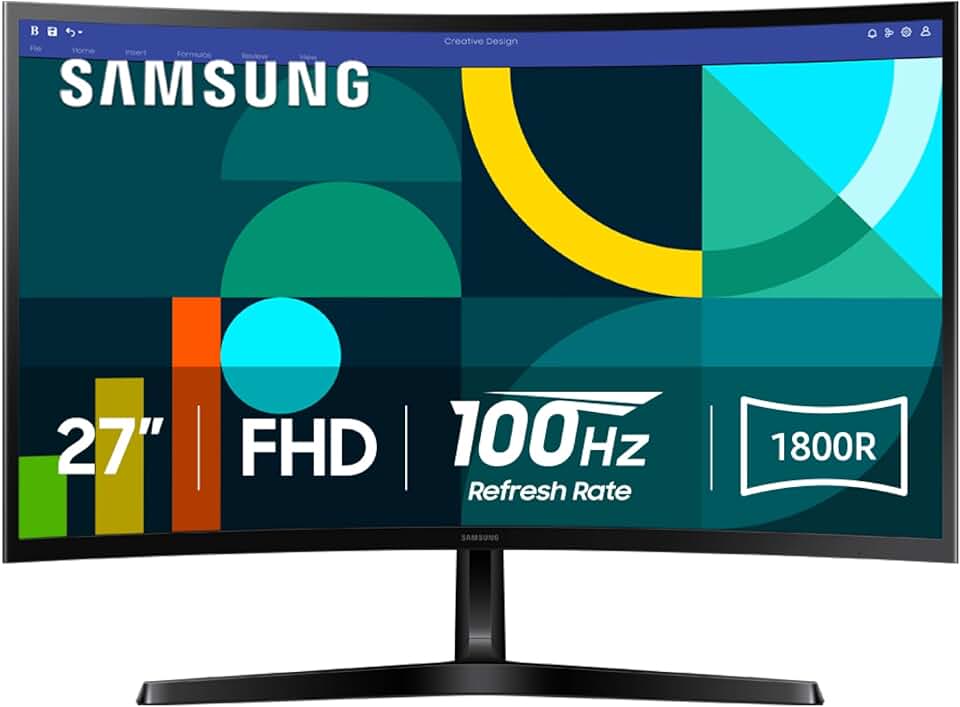
The Samsung S36GD Monitor (LS27D366GANXZA) emerges as a compelling option for users seeking an affordable yet feature-rich display for their daily computing needs. This 27-inch FHD 1800R curved monitor from Samsung’s Essential S3 series aims to deliver an immersive viewing experience without breaking the bank.
With a 100Hz refresh rate and advanced eye comfort technologies, it positions itself as a versatile screen suitable for both productivity and casual entertainment. We will delve deep into its capabilities, assessing its value proposition and determining if it lives up to the ‘Essential’ moniker.
Quick Summary: Samsung 27" Essential S3 (S36GD) Monitor
Rating: 4.6 out of 5 stars (1995 reviews)
Price: $129.99 USD
Key Pros:
- Immersive 1800R Curved Display: Enhances viewing comfort and field of vision for a more engaging experience.
- Smooth 100Hz Refresh Rate: Offers fluid motion for everyday tasks and casual gaming, a noticeable upgrade from 60Hz.
- Advanced Eye Comfort Features: Includes Flicker-Free technology and Eye Saver Mode to reduce strain during prolonged use.
- Excellent Value for Money: Delivers a compelling set of features at an highly competitive price point for a curved 27-inch monitor.
Key Cons:
- FHD Resolution at 27 Inches: Pixel density might be lower than some users prefer, potentially showing individual pixels at close viewing distances.
- Limited Ergonomic Adjustments: The stand primarily offers tilt functionality, lacking height, swivel, or pivot adjustments.
Table of Contents
Samsung S36GD Monitor Overview
The Samsung S36GD Monitor, model LS27D366GANXZA, is part of Samsung’s ‘Essential S3’ series for 2024, designed to offer a compelling blend of modern features and affordability. This 27-inch display stands out primarily due to its 1800R curvature, which aims to provide a more immersive and comfortable viewing experience compared to traditional flat screens.
At its core, the S36GD is a Full HD (1920×1080) monitor. While some might argue that 27 inches is a bit large for FHD resolution, Samsung has optimized this monitor for general productivity, web browsing, and casual media consumption where pixel density is less critical than screen real estate and viewing comfort.
The inclusion of a 100Hz refresh rate is a significant upgrade for an ‘essential’ monitor. This higher refresh rate translates into smoother motion on screen, whether you’re scrolling through documents, watching videos, or engaging in light gaming. It provides a noticeable improvement over standard 60Hz displays, reducing perceived blur and enhancing overall fluidity.
Samsung has also prioritized user comfort with advanced eye-care technologies. Features like Flicker-Free and Eye Saver Mode are integrated to minimize eye strain during extended usage, making it a thoughtful choice for students, remote workers, or anyone spending long hours in front of a screen.
The monitor’s aesthetic is clean and minimalist, aligning with modern home and office environments. Its slim bezels contribute to a more expansive visual experience, especially in multi-monitor setups. The build quality, while not premium, is solid and functional, reflecting its value-oriented positioning.
The 1800R curvature is a key differentiator, creating a uniform viewing distance across the entire screen. This design mimics the natural curve of the human eye, which can reduce eye movement and fatigue. For tasks like spreadsheet analysis or creative work, this gentle curve can help keep content at the edges of the screen within comfortable view.
While not targeting the high-end gaming or professional design markets, the Samsung S36GD Monitor successfully carves out a niche for users who desire an upgrade from basic flat panels. It delivers a modern, curved experience with enhanced refresh rates and eye comfort, all at an accessible price point, making it a strong contender in its category.
Understanding the monitor’s intended purpose is crucial for appreciating its design choices. It’s built for efficiency and comfort in everyday computing, offering a delightful visual experience without the premium price tag associated with higher resolutions or specialized gaming features. This balance of features and cost makes it a highly attractive option.
Compared to other monitors in its price bracket, the S36GD often outperforms with its 100Hz refresh rate and curvature. Many competitors at this price still offer only 60Hz or 75Hz flat panels, making Samsung’s offering stand out for its enhanced fluidity and immersive design. This competitive edge is a major selling point for budget-conscious buyers.
The 2024 model year suggests that Samsung has incorporated recent advancements in display technology and design trends. While specific year-over-year changes aren’t always explicitly detailed for essential series, it generally means optimized performance and potentially updated internal components for better efficiency and reliability.
The ‘Essential S3’ branding signifies Samsung’s commitment to providing core functionalities and user-centric features at an accessible level. It’s about delivering the most impactful improvements – like a curved screen and higher refresh rate – to a broader audience, ensuring quality and innovation aren’t exclusive to premium segments.
For more general information on Samsung monitors, you can visit their official page: Samsung Monitors.
Samsung S36GD Monitor Key Features & Specs
The Samsung S36GD Monitor is packed with features designed to enhance both productivity and entertainment. Understanding these specifications is key to appreciating its overall performance and value.
Display Technology and Design
- Screen Size: 27 inches
- Panel Type: VA (Vertical Alignment)
- Resolution: Full HD (1920 x 1080)
- Curvature: 1800R
- Aspect Ratio: 16:9
- Brightness: Typically around 250 cd/m²
- Contrast Ratio: High static contrast ratio, typical of VA panels (e.g., 3000:1)
The 27-inch screen size provides ample workspace for multitasking, allowing users to have multiple windows open simultaneously. The Full HD resolution, while not 4K, is perfectly adequate for most general computing tasks and helps keep the monitor’s price accessible.
The 1800R curvature is a significant feature, offering a more natural viewing experience that wraps the image around your field of vision. This can reduce peripheral distortion and make for a more comfortable and immersive experience, especially during long work sessions or movie watching. VA panels are known for their excellent contrast ratios and deep blacks, which contribute to a richer visual experience.
Performance and Gaming Features
- Refresh Rate: 100Hz
- Response Time: Often 4ms or 5ms GtG (Gray-to-Gray) for VA panels
- Game Mode: Optimized settings for gaming
The 100Hz refresh rate is a standout feature for a monitor in this price range. It provides a smoother visual experience compared to standard 60Hz monitors, reducing motion blur and making everything from web scrolling to casual gaming feel more fluid. This is particularly beneficial for users upgrading from older, slower displays.
While the response time might not be as blisteringly fast as dedicated esports monitors (which often boast 1ms), a 4ms or 5ms GtG response time is perfectly acceptable for casual gaming and general use. The dedicated Game Mode optimizes picture settings, such as contrast and sharpness, to enhance visibility in darker game scenes, giving a slight edge in certain titles.
Advanced Eye Comfort
- Flicker-Free Technology: Eliminates screen flickering that can cause eye strain.
- Eye Saver Mode: Reduces blue light emissions, which are known to disrupt sleep patterns and cause eye fatigue.
Samsung’s commitment to user well-being is evident in these eye comfort features. Flicker-Free technology ensures a stable and consistent image, preventing the invisible flickering that can lead to headaches and eye strain over time. Eye Saver Mode adjusts the screen’s color temperature to a warmer tone, filtering out harmful blue light, which is particularly useful for late-night work or study sessions.
These features collectively contribute to a more comfortable viewing experience, allowing users to spend longer periods in front of the screen with less discomfort. This is a crucial consideration for anyone using their monitor for extended durations.
Connectivity and Ergonomics
- Ports: 1x HDMI, 1x D-sub (VGA)
- Stand: Tilt-adjustable
- VESA Mount: Likely 75x75mm or 100x100mm (check specific product documentation for confirmation)
The connectivity options are standard for an essential monitor. HDMI is the primary digital input, compatible with most modern computers, gaming consoles, and media players. The inclusion of a D-sub (VGA) port offers legacy support, which can be useful for connecting older systems or as a backup option, though it transmits an analog signal.
The stand offers basic tilt adjustment, allowing users to find a comfortable viewing angle. While it lacks height, swivel, or pivot adjustments, the monitor’s likely VESA mount compatibility (common for Samsung monitors) means users can upgrade to a more ergonomic monitor arm or wall mount if desired, providing greater flexibility for their workspace setup. This allows for personalized positioning, which can significantly improve posture and comfort.
Additional Features
- Eco Saving Plus: Energy-saving features to reduce power consumption.
- OSD Menu: Intuitive on-screen display for easy settings adjustment.
Eco Saving Plus helps in reducing the monitor’s environmental footprint and electricity bill by intelligently adjusting brightness based on the image content. The OSD menu is user-friendly, allowing quick access to various display settings to customize the viewing experience. These small additions contribute to the overall user satisfaction and convenience of the Samsung S36GD Monitor.
For more details on curved display technology and its benefits, consider reading this informative article: Curved Display on Wikipedia.
Pros & Cons
Every product has its strengths and weaknesses, and the Samsung S36GD Monitor is no exception. A balanced view helps potential buyers make an informed decision tailored to their specific needs.
Key Pros of the Samsung S36GD Monitor
- Immersive 1800R Curved Display: The gentle 1800R curve significantly enhances the viewing experience. It creates a wider field of view and reduces the need for eye movement, making content at the edges of the screen feel closer and more integrated. This curvature is particularly effective for multimedia consumption and immersive work environments, drawing the user deeper into the content.
- Smooth 100Hz Refresh Rate: Moving beyond the standard 60Hz, the 100Hz refresh rate provides a noticeably smoother visual experience. This translates to less motion blur during fast-paced scenes, improved responsiveness in casual games, and a more fluid feel when scrolling through web pages or documents. It’s a significant upgrade for general use that many users will appreciate.
- Advanced Eye Comfort Features: Samsung has integrated Flicker-Free technology and Eye Saver Mode into the S36GD. These features actively work to reduce eye strain and fatigue, which is crucial for anyone spending extended periods in front of the screen. The reduction of blue light and elimination of invisible screen flickering contribute to a healthier and more comfortable viewing environment.
- Excellent Value for Money: At its price point, the S36GD offers an impressive array of features that often cost more. A 27-inch curved monitor with a 100Hz refresh rate and comprehensive eye care features represents a strong value proposition, making advanced display technology accessible to a broader audience. It delivers premium-like features without the premium price tag.
- High Contrast VA Panel: The VA panel technology provides superior contrast ratios compared to IPS or TN panels. This results in deeper blacks and more vibrant colors, which are particularly beneficial for watching movies or viewing photos. The enhanced contrast makes images pop, adding depth and richness to the visual output.
- Sleek and Modern Design: With slim bezels and a minimalist aesthetic, the Samsung S36GD monitor looks good on any desk. Its contemporary design ensures it blends seamlessly into various home or office setups, contributing to a clean and uncluttered workspace. The refined appearance is a definite plus for users who value aesthetics.
- Game Mode for Enhanced Experience: While not a dedicated gaming monitor, the inclusion of a Game Mode improves the experience for casual gamers. This mode optimizes display settings to bring out details in dark areas and reduce input lag, giving players a slight competitive edge and a more enjoyable gaming session without complex manual adjustments.
Key Cons of the Samsung S36GD Monitor
- FHD Resolution at 27 Inches: The Full HD (1920×1080) resolution on a 27-inch screen means a lower pixel density (PPI) compared to smaller FHD monitors or larger QHD/4K displays. This can result in text and images appearing slightly less sharp, with individual pixels potentially visible at closer viewing distances. Users accustomed to higher resolution screens might find this a downgrade for intricate work.
- Limited Ergonomic Adjustments: The included stand primarily offers tilt functionality, which allows for basic angle adjustments. However, it lacks crucial ergonomic features such as height adjustment, swivel, or pivot (portrait mode). This can make it challenging to achieve an optimal viewing posture, potentially leading to discomfort during long usage sessions unless paired with an aftermarket VESA mount.
- D-sub Port is Outdated: While useful for legacy connections, the D-sub (VGA) port is an older analog interface. It doesn’t support the same level of image quality or features as modern digital connections like HDMI or DisplayPort. For most contemporary setups, HDMI will be the preferred connection, rendering the D-sub port largely redundant for new devices.
- No USB Hub: The monitor does not include a built-in USB hub. This means users will need to rely on their computer’s ports for connecting peripherals like keyboards, mice, or webcams, which can be inconvenient for cable management and accessibility, especially if the PC tower is under a desk.
- Not Ideal for Professional Color Work: While the VA panel offers good contrast, it may not provide the color accuracy and wide viewing angles required for professional graphic design, video editing, or other color-critical applications. Professionals in these fields typically opt for IPS panels with broader color gamut coverage and factory calibration.
Who Should Buy the Samsung S36GD Monitor?
The Samsung S36GD Monitor is designed to cater to a specific segment of the market, offering a compelling blend of features for its price. Understanding its ideal user base can help you determine if this monitor is the right fit for your needs.
Budget-Conscious Students and Home Users
For students and general home users looking for a significant upgrade from smaller, older, or flat monitors, the S36GD offers tremendous value. Its 27-inch screen provides ample space for research, writing papers, and casual web browsing. The immersive curved display and eye comfort features are particularly beneficial for long study sessions or relaxed media consumption.
The affordable price point makes it an attractive option for those furnishing a dorm room or a home office on a tight budget. It delivers a modern monitor experience without the premium cost often associated with curved displays or higher refresh rates. This balance of cost and features is a key draw for this demographic.
Office Workers and Remote Professionals
Professionals who spend their days working with documents, spreadsheets, and emails will appreciate the large screen real estate and ergonomic benefits of the S36GD. The 1800R curve can reduce eye strain by keeping all parts of the screen equidistant from the viewer’s eyes, enhancing comfort during prolonged work hours.
The 100Hz refresh rate, while not critical for static office tasks, provides a smoother experience when scrolling through long documents or switching between applications. The Eye Saver Mode is also a significant advantage for reducing fatigue during an eight-hour workday. It’s a solid choice for enhancing productivity in a home office setup.
Casual Gamers and Multimedia Enthusiasts
While not a high-end gaming monitor, the S36GD is an excellent choice for casual gamers and multimedia enthusiasts. The 100Hz refresh rate offers a noticeable improvement over standard 60Hz displays, making games feel more fluid and responsive. The Game Mode further optimizes visual settings for a better gaming experience.
The curved screen enhances immersion, especially in single-player story-driven games or racing simulators. For watching movies and TV shows, the VA panel’s high contrast ratio and deep blacks contribute to a more cinematic and enjoyable viewing experience. It’s perfect for those who enjoy gaming and media but don’t need top-tier competitive performance.
Users Upgrading from Older Displays
If you’re currently using an old 60Hz flat panel monitor, the S36GD represents a substantial upgrade. The combination of a larger screen, a curved design, and a higher refresh rate will immediately transform your computing experience. It offers a modern aesthetic and enhanced features that make daily tasks more enjoyable and less fatiguing.
The move to a curved display, even at FHD, can feel like a significant leap in visual comfort and immersion. This monitor is perfect for those seeking a tangible improvement in their display technology without investing in high-end, specialized hardware.
Who Might Want to Consider Other Options?
- Professional Graphic Designers/Video Editors: For color-critical work, an IPS panel with higher color accuracy and wider color gamut coverage would be a better choice. The S36GD’s VA panel, while good for contrast, isn’t optimized for professional color grading.
- Competitive Esports Gamers: While 100Hz is good, competitive gamers often demand higher refresh rates (144Hz, 240Hz, or more) and lower response times (1ms or less) found in specialized gaming monitors for a true competitive edge.
- Users Demanding High Pixel Density (4K/QHD): If you work with extremely detailed content or prefer razor-sharp text and images, a 27-inch FHD monitor might not offer the pixel density you desire. In such cases, a 27-inch QHD (2560×1440) or larger 4K monitor would be more suitable, albeit at a higher cost.
- Users Needing Advanced Ergonomics: If height adjustability, swivel, or pivot functions are essential for your workspace setup, the S36GD’s basic tilt-only stand will be a limitation. While VESA mounting is an option, it adds extra cost and effort.
In summary, the Samsung S36GD Monitor excels as an all-around display for the average user, offering premium features at an accessible price point. It’s a smart choice for anyone looking to enhance their daily computing and entertainment without overspending.
FAQ about Samsung S36GD Monitor
Here are some frequently asked questions about the Samsung S36GD Monitor, providing more detailed answers to common inquiries.
Q1: Is the 1800R curve noticeable and beneficial?
A: Yes, the 1800R curve is quite noticeable, especially when you first start using the monitor. It’s a moderate curve that provides a more immersive viewing experience by subtly wrapping the edges of the screen towards you. This design helps reduce peripheral distortion and keeps all parts of the display equidistant from your eyes, which can lead to reduced eye strain during long sessions. It feels more natural and engaging than a flat screen for many users.
Q2: Is 100Hz refresh rate really better than 60Hz?
A: Absolutely. While 60Hz is the standard, 100Hz offers a noticeably smoother experience across various tasks. When scrolling through web pages, moving your mouse, or watching fast-paced video content, the increased refresh rate results in less motion blur and a more fluid visual. For casual gaming, it provides a significant boost in responsiveness and visual clarity compared to 60Hz, making the action feel more immediate and enjoyable.
Q3: Can I use this monitor for gaming?
A: Yes, the Samsung S36GD Monitor is suitable for casual gaming. The 100Hz refresh rate is a great improvement over 60Hz for many game genres, offering smoother gameplay. It also includes a Game Mode that optimizes picture settings for a better experience. However, for competitive esports where every millisecond counts, dedicated gaming monitors with higher refresh rates (144Hz+) and lower response times (1ms) would be more appropriate.
Q4: What are the benefits of Eye Saver Mode?
A: Eye Saver Mode is designed to reduce eye fatigue. It works by decreasing the amount of blue light emitted by the screen, which is known to disrupt sleep patterns and cause strain, especially during evening use. By shifting the color temperature to a warmer tone, it creates a more comfortable viewing environment. Coupled with Flicker-Free technology, it makes the monitor much easier on your eyes during extended use.
Q5: Does it have VESA mount support?
A: While the product description primarily mentions the tilt-adjustable stand, most Samsung monitors, even in their essential series, typically include VESA mount compatibility (e.g., 75x75mm or 100x100mm). This allows you to remove the factory stand and attach the monitor to a monitor arm or wall mount for greater ergonomic flexibility. It’s recommended to check the specific product manual or Samsung’s official support page for the exact VESA standard for model LS27D366GANXZA.
Q6: What cables come with the monitor?
A: Typically, essential monitors like the Samsung S36GD come with at least one HDMI cable to get you started immediately. Some models might also include a D-sub (VGA) cable for legacy connections, but this can vary by region and specific package. It’s always a good idea to check the product listing or manual for the exact contents included in the box.
Q7: Is the FHD resolution sufficient for a 27-inch screen?
A: For most general users, students, and office workers, FHD (1920×1080) resolution on a 27-inch screen is perfectly sufficient. It provides a good balance of screen real estate and performance at an affordable price. However, if you sit very close to the screen, or if your work involves intricate details like graphic design or extensive text editing, you might notice individual pixels more readily. In such cases, a QHD (2560×1440) resolution at 27 inches would offer a sharper image, but also at a higher cost.
Q8: How does Game Mode work on the Samsung S36GD Monitor?
A: Game Mode is a pre-set display optimization feature. When activated, it automatically adjusts various picture settings such as contrast, sharpness, and color saturation to enhance visibility in games, especially in dark scenes where enemies or details might be hidden. It aims to provide a more dynamic and engaging visual experience for gamers without requiring manual tweaking of individual settings. It’s a convenient feature for quick optimization.
Final Verdict
The Samsung S36GD Monitor (LS27D366GANXZA) carves out an impressive niche in the competitive monitor market, especially for those seeking a modern display experience without a hefty price tag. It successfully delivers on its ‘Essential S3’ promise by integrating key features that genuinely enhance daily computing and entertainment.
Its 27-inch 1800R curved FHD display, coupled with a smooth 100Hz refresh rate, offers a noticeably more immersive and fluid visual experience than many of its flat-panel, 60Hz competitors. The advanced eye comfort technologies, including Flicker-Free and Eye Saver Mode, are thoughtful additions that significantly contribute to user well-being during extended use, making it a responsible choice for long hours in front of the screen.
While the FHD resolution at 27 inches might not satisfy pixel-peepers or professional designers, it is more than adequate for the vast majority of users, including students, home office workers, and casual gamers. The monitor’s high contrast VA panel provides deep blacks and vibrant colors, further enhancing its appeal for multimedia consumption.
The limited ergonomic adjustments and the inclusion of an older D-sub port are minor drawbacks, but these are largely offset by the monitor’s excellent value proposition and potential VESA mount compatibility. For its price, the S36GD provides a robust set of features that punch above its weight class.
In conclusion, if you are in the market for an affordable, large, curved monitor that offers a smoother experience than standard displays and prioritizes eye comfort, the Samsung S36GD Monitor is an outstanding choice. It’s an impressive value that will elevate your daily digital interactions, making it a highly recommended upgrade for many users.