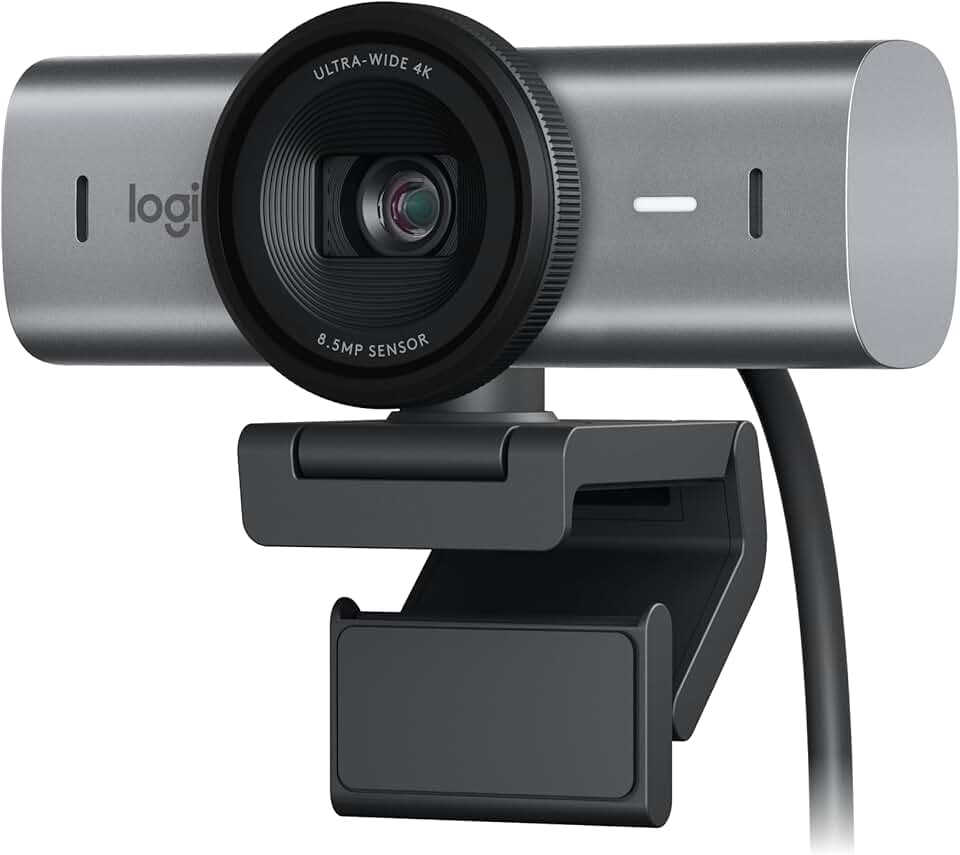
Real-World Test: Logitech MX Brio — Full Verdict
The Logitech MX Brio stands as a formidable contender in the premium webcam market, promising an unparalleled video conferencing and streaming experience. This advanced device caters specifically to professionals, content creators, and anyone who demands exceptional visual and audio clarity in their online interactions. It represents a significant leap forward in webcam technology, integrating cutting-edge features to elevate your digital presence.

Quick Summary: Logitech MX Brio
- Rating: 4.5 out of 5 stars
- Price: $199.99 USD
- Key Pros:
- Exceptional 4K Ultra HD video quality for superior clarity.
- Advanced AI features like RightLight 5 and auto-framing.
- Innovative Show Mode for presenting physical objects.
- Premium build quality with a sleek, durable design.
- Key Cons:
- Premium price point might be prohibitive for some users.
- 4K streaming requires significant bandwidth and system resources.
Table of Contents
Logitech MX Brio Overview
The Logitech MX Brio is not just another webcam; it’s a meticulously engineered device designed to meet the rigorous demands of today’s digital communication landscape. Positioned at the high-end of the webcam spectrum, it targets users who cannot compromise on video and audio quality for their virtual meetings, content creation, or live streaming activities.
Logitech has a long-standing reputation for producing reliable peripherals, and the MX Brio builds upon this legacy by pushing the boundaries of what a webcam can achieve. It integrates into the broader Logitech MX ecosystem, known for its premium productivity tools, offering a seamless and cohesive user experience.
This webcam is particularly appealing to remote professionals and executives who frequently engage in high-stakes video calls. For these individuals, presenting a sharp, clear, and professional image is crucial for maintaining credibility and effective communication. The MX Brio delivers exactly that, ensuring every detail is captured with stunning fidelity.
Content creators and streamers also find immense value in the MX Brio. Whether producing YouTube videos, live streaming on Twitch, or conducting online workshops, the camera’s 4K Ultra HD resolution and advanced features ensure that the audience receives a top-tier visual experience. This level of quality helps creators stand out in a crowded digital space.
The MX Brio distinguishes itself from standard 1080p webcams, which, while adequate for basic use, often fall short in challenging lighting conditions or when detailed visuals are paramount. Compared to other 4K webcams, the MX Brio’s strength lies in its sophisticated AI-powered image processing and its unique Show Mode feature, which adds practical utility beyond basic video capture.
Its design ethos reflects its premium status, featuring a sleek, durable aluminum housing that not only looks professional but also ensures longevity. The adjustable mount provides flexibility, allowing users to position the camera optimally on various monitors or tripods, adapting to diverse workstation setups.
The software integration with Logitech G HUB and Logi Tune further enhances its appeal. These applications allow for extensive customization of video settings, ensuring that users can fine-tune their image to perfection, regardless of their environment or specific requirements. This control empowers users to consistently achieve their desired look and feel.
In essence, the Logitech MX Brio is engineered for peak performance, blending superior hardware with intelligent software to offer a comprehensive solution for anyone serious about their online presence. It’s an investment in quality that pays dividends in professional appearance and communication effectiveness, setting a new benchmark for premium webcams.
From virtual classrooms to corporate boardrooms, the MX Brio is designed to perform. It minimizes distractions with its superior noise reduction capabilities and ensures consistent illumination thanks to its RightLight 5 technology. This holistic approach to webcam design makes it a versatile tool for a wide array of demanding applications.
Logitech MX Brio Key Features & Specs
The Logitech MX Brio is packed with advanced technologies that set it apart from conventional webcams. Its feature set is meticulously crafted to deliver an exceptional user experience, focusing on image quality, intelligent processing, and practical utility. Let’s delve into the core specifications and innovative functionalities.
Video Resolution and Frame Rate
At the heart of the MX Brio is its ability to capture stunning 4K Ultra HD (2160p) video at 30 frames per second (fps). This resolution provides incredible detail and clarity, making your video calls and streams look remarkably professional. Every nuance, from facial expressions to fine textures, is rendered with precision.
For scenarios demanding smoother motion, the MX Brio also supports 1080p Full HD at 60 fps. This higher frame rate is ideal for live streaming fast-paced content, gaming, or any situation where fluid movement is critical. The flexibility to switch between resolutions allows users to optimize performance based on their specific needs and available bandwidth.
Sensor and Lens Technology
The MX Brio incorporates a larger sensor compared to many standard webcams, which is crucial for superior image quality. This larger sensor captures more light, resulting in better performance in challenging lighting conditions and reduced digital noise. The camera also features a high-quality glass lens, ensuring optical precision and color accuracy.
The combination of a premium sensor and a sophisticated lens system is what enables the MX Brio to produce such vibrant, true-to-life colors and sharp images. This hardware foundation is essential for delivering a consistently high-quality video feed, regardless of the environment.
AI-Powered Image Optimization: RightLight 5
Logitech’s proprietary RightLight 5 technology is a standout feature, utilizing AI to automatically adjust exposure, white balance, and contrast in real-time. This ensures you always look your best, even in dimly lit rooms, harsh backlighting, or unevenly lit spaces. It intelligently optimizes the image to present a natural and well-balanced appearance.
Beyond lighting, the MX Brio features advanced auto-focus capabilities, keeping you sharp and clear even if you move within the frame. AI-powered auto-framing can also keep you centered in the shot, providing a dynamic and engaging visual experience for your audience without manual adjustments.
Innovative Show Mode
One of the most unique and practical features of the Logitech MX Brio is its Show Mode. This innovative function allows you to effortlessly tilt the camera down to share physical objects or documents on your desk. It’s incredibly useful for presentations, educational demonstrations, or showing off products and prototypes.
Imagine being able to seamlessly transition from a face-to-face discussion to demonstrating a physical product or sketching out an idea on paper, all within the same video call. Show Mode eliminates the need for a separate document camera or complex setup, streamlining your workflow and enhancing engagement.
Superior Audio Capture
The MX Brio is equipped with dual beamforming microphones that are designed to capture your voice clearly while simultaneously reducing background noise. This intelligent audio processing ensures that your message comes through loud and clear, minimizing distractions from ambient sounds like keyboard clicks or room echoes.
High-quality audio is just as important as video for effective communication, and the MX Brio addresses this with its robust microphone array. It ensures that your voice is the focal point, enhancing the professionalism of your calls and streams.
Privacy and Connectivity
For peace of mind, the Logitech MX Brio includes a convenient physical privacy shutter. A simple slide of a switch physically blocks the camera lens, guaranteeing privacy when the webcam is not in use. This feature is essential in an era where digital security is a paramount concern.
Connectivity is straightforward with a USB-C interface, offering plug-and-play compatibility with most modern computers. It supports various operating systems, including Windows, macOS, and ChromeOS, ensuring broad accessibility. The camera is also compatible with leading video conferencing platforms like Zoom, Microsoft Teams, and Google Meet, as well as streaming software like OBS.
Build Quality and Design
Crafted with a premium aluminum housing, the MX Brio boasts a sleek and minimalist design that complements any professional workspace. Its robust construction ensures durability, while the adjustable clip allows for secure mounting on monitors of varying thicknesses or attachment to a standard tripod. This combination of aesthetics and functionality underscores its high-end positioning. You can learn more about Logitech’s design philosophy on their official design page.
Pros & Cons
Evaluating any premium product involves weighing its strengths against its potential drawbacks. The Logitech MX Brio, while offering an impressive array of features, is no exception. Understanding its advantages and limitations will help prospective buyers make an informed decision about whether it aligns with their needs and budget.
Pros of the Logitech MX Brio
- Unrivaled 4K Image Quality: The most significant advantage of the MX Brio is its exceptional 4K Ultra HD resolution. This delivers unparalleled sharpness, vivid color reproduction, and intricate detail, making your video feed look incredibly professional and lifelike. It’s a noticeable upgrade from 1080p webcams.
- Excellent Low-Light Performance: Thanks to Logitech’s RightLight 5 technology and a larger sensor, the MX Brio performs remarkably well in challenging lighting conditions. It intelligently adjusts to produce a bright, clear image even in dimly lit rooms or with harsh backlighting, reducing graininess and maintaining detail.
- Innovative Show Mode: This unique feature allows users to tilt the camera down to display physical objects or documents on their desk. It’s a game-changer for educators, designers, and anyone needing to share tangible items during a video call or presentation, adding a layer of interactivity and clarity.
- Superior Audio Capture: Equipped with dual beamforming microphones and advanced noise reduction, the MX Brio ensures your voice is picked up clearly while minimizing distracting background sounds. This results in crisp, professional-sounding audio that enhances communication.
- Premium Build and Design: The webcam boasts a sleek, durable aluminum housing that not only looks professional but also feels robust. Its high-quality construction ensures longevity and adds a touch of elegance to any workspace. The adjustable mount is stable and versatile.
- Extensive Software Features: Integration with Logitech G HUB and Logi Tune software provides comprehensive control over video settings. Users can customize resolution, frame rate, field of view, and other parameters, allowing for fine-tuning to achieve the perfect image for any situation.
- Enhanced Privacy: The inclusion of a physical privacy shutter offers peace of mind, allowing users to physically block the lens when the camera is not in use. This simple yet effective feature addresses privacy concerns directly and reliably.
- Future-Proofing: Investing in a 4K webcam like the MX Brio helps future-proof your setup. As internet speeds and display technologies advance, 4K will become even more standard, ensuring your webcam remains relevant and high-performing for years to come.
Cons of the Logitech MX Brio
- Premium Price Point: The most notable drawback is its cost. The Logitech MX Brio is a significant investment compared to many other webcams on the market. This premium price might be prohibitive for casual users or those with tighter budgets, making it a niche product.
- Demanding System Requirements: To fully utilize the 4K capabilities of the MX Brio, especially for streaming or recording at higher frame rates, a robust computer system and a strong, stable internet connection are essential. Users with older hardware or slower internet might experience performance limitations.
- Digital Zoom Only: While the MX Brio offers zoom functionality, it is digital, not optical. This means that zooming in will result in some loss of image quality, especially at higher magnification levels. For users requiring precise, lossless zoom, this might be a minor limitation.
- Potential for Over-Processing: In certain specific scenarios, some users might find that the AI-powered image optimization, while generally beneficial, can sometimes lead to an overly processed or